
BlackCoat journal
By BlackCoat Services
Updated
6 min read
STL or STEP: what file should you send for a 3D-printing quote?
Understand what STL and STEP files communicate, when each may be useful, and what project information to include with a 3D-printing quote request.
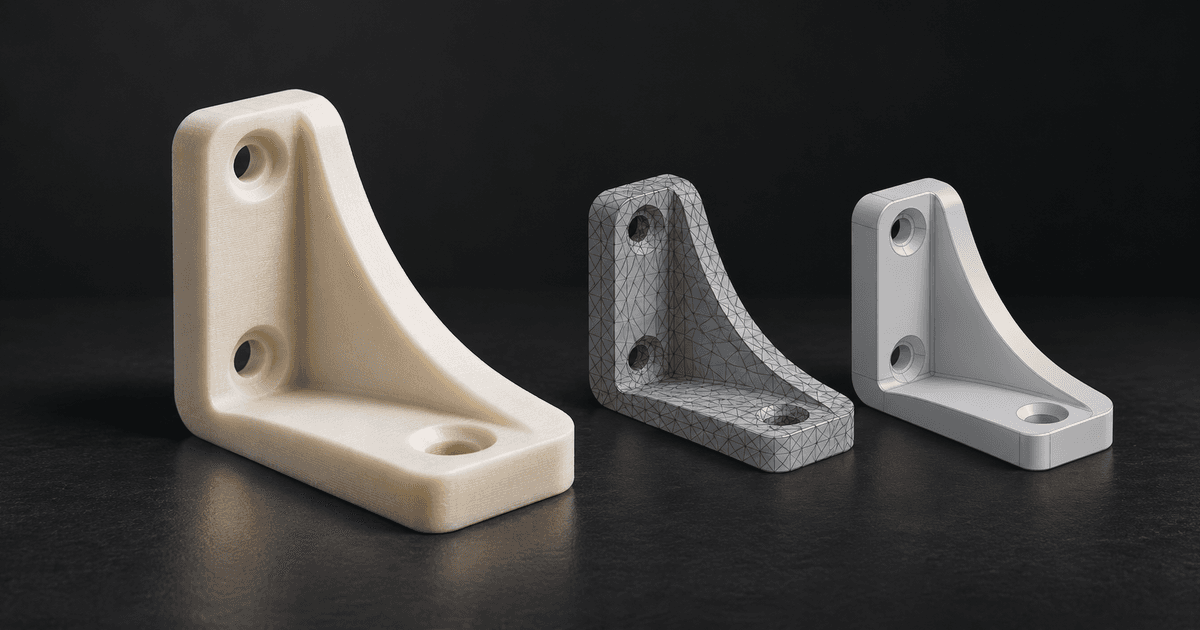
Send a STEP file when one is available and supported because it can give the supplier richer engineering geometry to review. A checked STL may still be sufficient when it represents the approved shape needed for the intended work. If you send both, identify which file and revision should govern the enquiry.
Neither extension proves that a part is ready for production. File condition, scale, revision, intended use, critical interfaces, quantity, finish and required date still need to be understood. Choose the file package that communicates those requirements most clearly.
What does an STL file contain?
An STL describes a surface as a collection of triangular facets. The triangles approximate the exported shape, so the result depends partly on how the source system created the mesh. The format is widely used in additive workflows, but it does not by itself explain feature history, named dimensions, design constraints or why an interface matters.
That does not make every STL unsuitable. A mesh can be a useful production input when its shape, scale, geometry condition and revision have been checked for the intended workflow. It should still be treated as an exported representation, not as a complete project brief.
What does a STEP file contain?
STEP is an engineering exchange format designed to move product-model data between compatible systems. It can carry richer geometric definitions than a triangular surface mesh, which may make faces, curves, holes, assemblies or other model structure easier to inspect during design and production review.
A STEP file is not necessarily the original native CAD model. It may not contain the source application's editable feature tree, design history or every piece of product information. What can be inspected or changed depends on the exported data and the receiving software.
When is STEP more useful for review?
STEP is often the more useful starting point when geometry may need design work, controlled surfaces need inspection or the supplier must understand how features relate. It can reduce the need to infer engineering geometry from triangles, but it does not remove the need for drawings, dimensions or project requirements where those control acceptance.
- The part may need CAD repair, adaptation or another design revision.
- Curves, holes, mating faces or assembly structure need engineering review.
- The supplier needs to inspect model geometry before selecting a production route.
- A mesh export would hide information that remains useful to the next design stage.
When may an STL be enough?
An STL may be enough when it is the controlled representation of an approved shape, opens at the intended scale, contains the intended bodies and does not require geometric redesign. Suitability still depends on the supplier's workflow and the part's requirements, so a familiar extension should not be mistaken for automatic production approval.
If the STL came from another person or an older project, explain what is known about it. A supplier cannot reliably infer whether a mesh is the latest revision, whether wear or damage was copied into it, or which surfaces must fit another component merely from the triangles.
Why does converting STL to STEP not restore the original CAD?
Placing mesh data into a different file container does not automatically recreate the analytic surfaces, dimensions, constraints or feature history used to make the original model. Useful reconstruction may require deliberate CAD work based on the mesh, measurements and intended function. Renaming or converting a file should not be presented as recovering information that was never present in the export.
Identify the governing file and revision
Sending several files can help, but only if their relationship is clear. State which file controls the requested part and whether the others are references, previous versions or supporting drawings. Use distinct revision names and avoid sending conflicting models without explaining the difference.
Check the file before sending it
- Open the exported file separately and confirm it contains the intended part or assembly.
- State the intended scale or units, especially for formats or workflows where that may be ambiguous.
- Check for missing, duplicate or unintended bodies and obvious geometry problems.
- Give the file a clear part name and revision rather than relying on a generic export name.
- Identify any drawing, photograph or earlier model that is included only as supporting information.
What information should accompany the geometry?
A model shows shape, but a quote review also needs context. Describe what the part must do, where it will be used, which dimensions or interfaces matter, how many are required, the expected finish and the required date. Mention assembly, handling, loads or environmental conditions that could affect process and material review without assuming the file communicates them.
For a BlackCoat enquiry, use a personal or work email where we can reach you. Company details are optional. The quote form accepts up to five files with a combined limit of 15 MB. If you only have a sketch or photographs, send those and explain which parts of the design still need help.
Send suitable geometry with an identified revision and enough project context for the supplier to review the next step. If information is missing, say what remains to be decided so it can be clarified before production.
Next steps